Introduction
CoKeeps Hot Wallet equips your platform with secure digital asset capabilities, enabling you to build and operate your products on desktop, web, or mobile while relying on CoKeeps as the back-end engine for wallet operations, security, and digital asset management.
Before proceeding with this guide, we recommend reviewing the Knowledge Base section to familiarise yourself with the core concepts and terminology used throughout.
Concept
CoKeeps Hot Wallet is a modular, API-driven system designed as a set of "building blocks" that you can assemble to support a wide range of use cases - from simple payout flows to complex custodial platforms. You integrate it into your existing backend and frontends (desktop, web, or mobile), automate operations via API, and focus on your core product and business logic while CoKeeps handles wallets, keys, and security behind the scenes.
Integration requires only a lightweight extension on your backend API to handle verification and notification flows. No Personally Identifiable Information (PII) about your users is transmitted to, or stored in, CoKeeps Hot Wallet. Instead, your platform passes Universally Unique Identifiers (UUIDs) that CoKeeps uses as opaque references to your users and their activity.
Unlike conventional REST API models, CoKeeps Hot Wallet does not rely on static API keys, bearer tokens, or HMAC secrets that developers can use to impersonate end users. Each end user is instead associated with their own cryptographic key pair, handled by CKSDK, and all relevant requests are signed and transmitted securely. This design reduces the risk of credential leakage, mitigates spoofing by developers or backend systems, and provides clear per-user accountability.
CKSDK supports several integration strategies, allowing you to balance security, complexity, and developer control:
- Backend-only CKSDK: Simplest model, where CKSDK runs on your backend and signs on behalf of users. It behaves similarly to an API-key pattern (developers have high control) but is more secure because no static secrets are exposed.
- Backend CKSDK with Frontend Bridge: A frontend "bridge" wraps user context into a secure envelope that is passed to CKSDK on the backend. No user secret needs to be stored, and accountability is improved while developers retain some control.
- Frontend CKSDK: The highest-security model, where CKSDK runs in the frontend and users sign directly with their own key pairs. Developers cannot act on behalf of users and are responsible only for integration and orchestration.
Across all models, CKSDK is the core component that manages key pairs, signs requests, and enforces the Hot Wallet security model, helping reduce integration mistakes while keeping you in control of how tightly user identity is bound to on-chain actions.
Topology
Overview of Frontend CKSDK Integration (Highest Security)
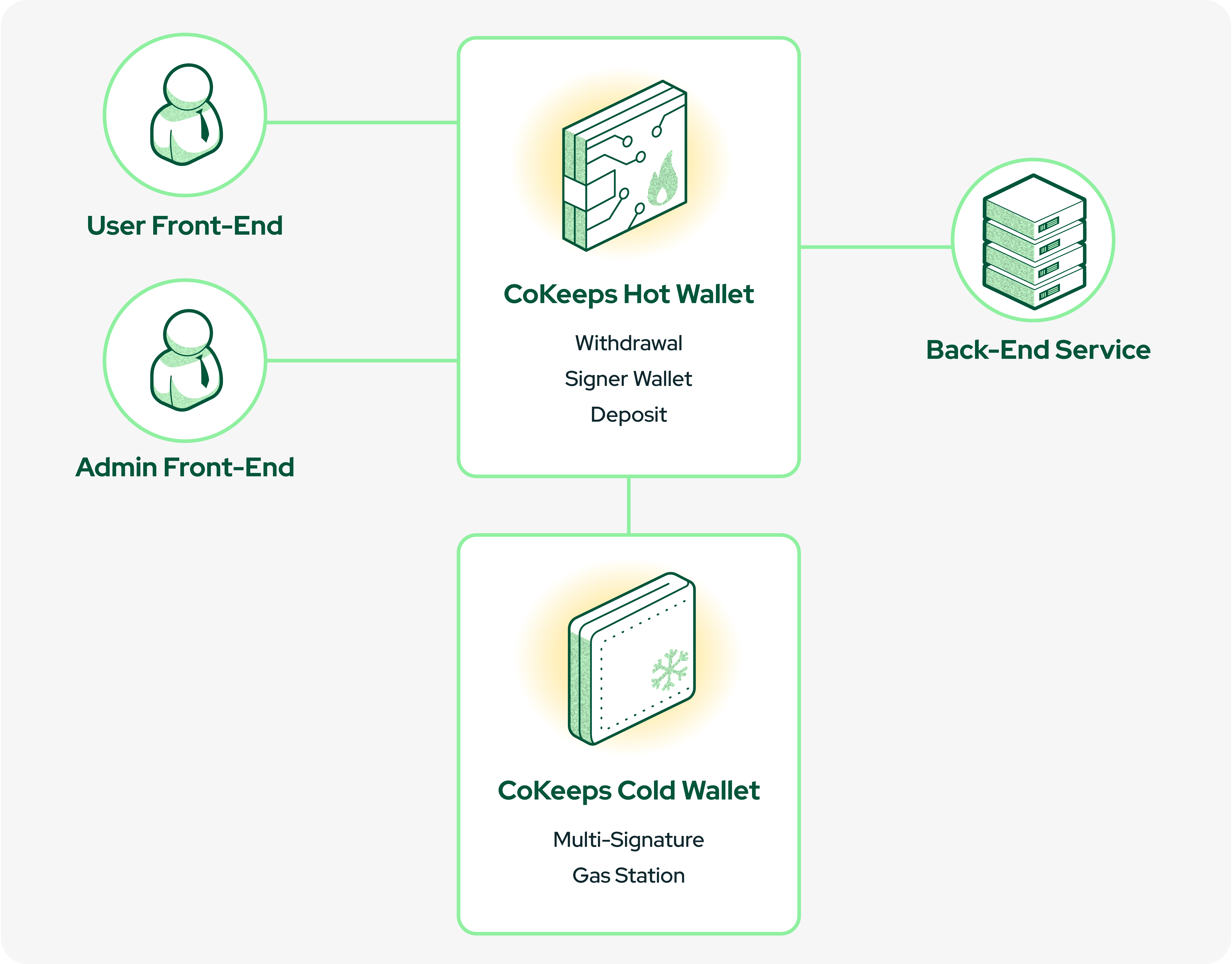
In a Frontend CKSDK integration model, your architecture typically consists of the following components:
User Frontend: The application your end users interact with (desktop, web, or mobile). Users authenticate, view balances, and initiate actions such as transfers. CKSDK runs here, so requests are signed directly with the user’s cryptographic key pair.
Admin Frontend: The interface used by your operational or compliance teams. CKSDK also runs here, allowing administrators to securely sign and authorise higher-risk actions such as reviewing and approving destination addresses, screening Travel Rule information, performing re-balancing operations, and managing other governance-related workflows.
Backend Service: Your server-side service that exposes the four required receiving endpoints to CoKeeps Hot Wallet. It provides user- and account-level rules (limits, statuses, controls) and ensures that any action taken through the Hot Wallet remains subject to your organisation's policies and consent.
CoKeeps Frontend Platform: This includes CoKeeps Administration and CoKeeps Cold Wallet. It acts as the governance and configuration layer for the Hot Wallet defining behaviour, linking selected multi-signature accounts, and exposing smart contract functions that your platform can leverage.
Environment and Chains
In the CoKeeps ecosystem, blockchain networks (such as mainnet and testnet) are identified by their Chain ID. CoKeeps does not provide a separate “test” or “sandbox” environment at the application level. Instead:
- Use a testnet (or equivalent non-production network) when you need to perform dummy or test transactions.
- Use mainnet when you are dealing with real-value transactions.
Below are simplified examples of how networks and assets are represented:
Example of a Network-Native Asset: Represents the native currency of a blockchain (e.g., ETH on Ethereum, SOL on Solana). It is issued by the network itself and is typically used to pay gas/transaction fees.
// This is a native
{
	"id": "solanadevnet",
	"name": "Solana Devnet",
	"base": "solana",
	"currency": "Solana",
	"symbol": "SOL",
	"decimals": 9,
	"token": null
}
Example of a Token: Represents an asset managed by a smart contract or program on top of a blockchain (e.g., an ERC-20 or SPL token). The token’s behaviour and supply are controlled by its contract, not by the base protocol.
// This is a SPL-Token token.
// Imported by Authoriser via the CoKeeps Cold Wallet
{
	"id": "2d3b8da918b7ef3d9bf14260c13b2e5d3038d238b31b7931cc16c45d5f20027e",
	"name": "USD Coin - Circle",
	"base": "solana",
	"currency": "USD Coin",
	"symbol": "USDC",
	"decimals": 9,
	"token": {
		"type":"SPL-Token",
		"address":"EPjFWdd5AufqSSqeM2qN1xzybapC8G4wEGGkZwyTDt1v"
	}
}